Apptainer Definition Files
For a reproducible, verifiable and production-quality container you should build a SIF file using an Apptainer definition file. This also makes it easy to add files, environment variables, and install custom software. You can start with base images from Docker Hub and use images directly from official repositories such as Ubuntu, Debian, CentOS, Arch, and BusyBox.
A definition file has a header and a body. The header determines the base container to begin with, and the body is further divided into sections that perform things like software installation, environment setup, and copying files into the container from the host system, etc. Here is an example of a lolcow.def definition file and give name of build as lolcow.sif
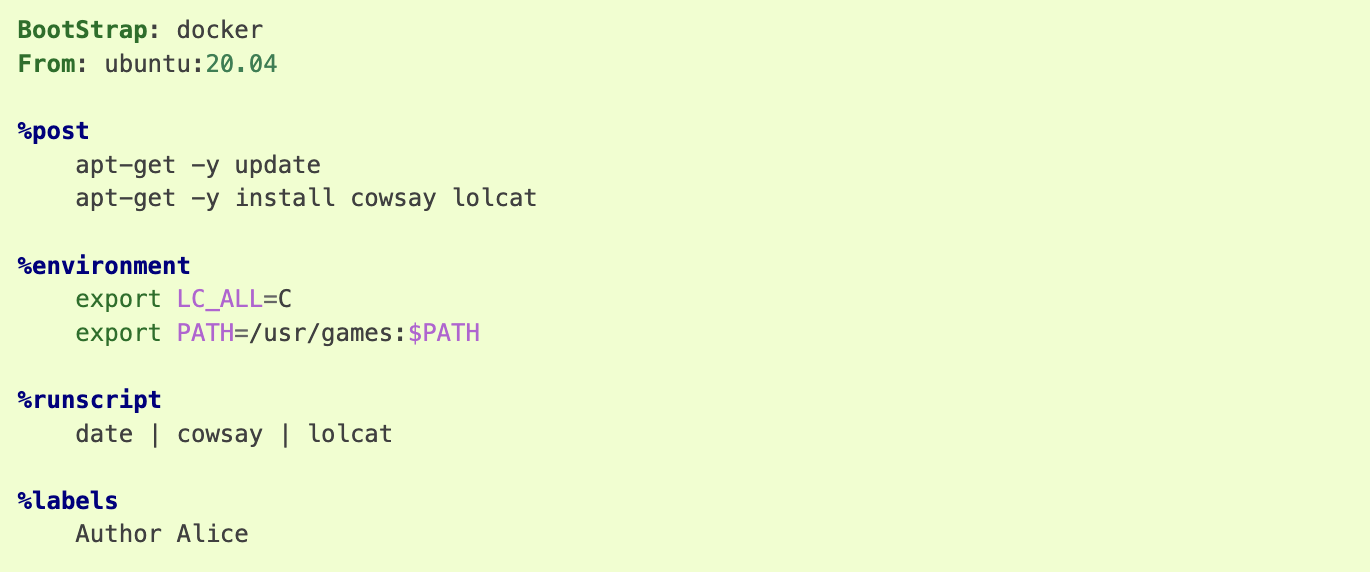
assuming it is a file named lolcow.def. To build a container from this definition file,
$ apptainer build lolcow.sif lolcow.def
If it needed root credentials make use of –fakeroot to container to build lolcow.sif image from def file. Initially you need to get the fake root permissions from IDSC and requested to raise the ticket with brief description of project requirement here:.
$ apptainer build --fakeroot lolcow.sif lolcow.def
In this example, the header tells Apptainer to use a base Ubuntu 16.04 image from the default OCI registry.
The %post section executes within the container at build time after the base OS has been installed. The %post section is therefore the place to perform installations of new applications.
The %environment section defines some environment variables that will be available to the container at runtime.
The %runscript section defines actions for the container to take when it is executed.
And finally, the %labels section allows for custom metadata to be added to the container.This is a very small example of the things that you can do with a definition file. You can also use an existing container on your host system as a base.
For more details about def files: https://apptainer.org/docs/user/1.1/definition_files.html#definition-files
We have changed def file in above link as rajsample.def and given name of build as raj_container.sif
Bootstrap: docker
From: ubuntu:18.04
Stage: build
%setup
    touch /nethome/pegasus_usrid/file1
    touch ${APPTAINER_ROOTFS}/file2

%files
    /nethome/pegasus_userid/file1
    /nethome/pegasus_userid/file1 /opt

%environment
    export LISTEN_PORT=12345
    export LC_ALL=C


%post
    apt-get install -y netcat
    NOW=`date`
    echo "export NOW=\"${NOW}\"" >> $APPTAINER_ENVIRONMENT

%runscript
    echo "Container was created $NOW"
    echo "Arguments received: $*"
    exec echo "$@"

%startscript
    nc -lp $LISTEN_PORT

%test
    grep -q NAME=\"Ubuntu\" /etc/os-release
    if [ $? -eq 0 ]; then
        echo "Container base is Ubuntu as expected."
    else
        echo "Container base is not Ubuntu."
        exit 1

    fi

%labels
    Author alice
    Version v0.0.1

%help

    This is a demo container used to illustrate a def file that uses all supported sections.
$ apptainer build --notest raj_container.sif rajsample.def

INFO:    User not listed in /etc/subuid, trying root-mapped namespace
INFO:    fakeroot command not found
INFO:    Installing some packages may fail
INFO:    Starting build...
INFO:    Adding help info
INFO:    Adding labels
INFO:    Adding environment to container
INFO:    Adding startscript
INFO:    Adding runscript
INFO:    Adding testscript
INFO:    Creating SIF file...
INFO:    Build complete: raj_container.sif
$ apptainer test  raj_container.sif       # testing container
INFO:    Converting SIF file to temporary sandbox...
INFO:    underlay of /etc/localtime required more than 50 (66) bind mounts
Container base is Ubuntu as expected.
$./raj_container.sif Welcome to IDSC University of Maimi@!   # Running container with input text
Container was created Thu Jul 27 15:53:21 UTC 2023
Arguments received: Welcome to IDSC University of Maimi@!
Welcome to IDSC University of Maimi@!